
Google Ads for Beginners in India 2026: The Complete Step-by-Step Guide
If you have been wondering how to run Google Ads in India but feel stuck at the starting line, this guide is for you. Whether you run a coaching institute in Pune, a boutique in Jaipur, or an online store shipping across India, Google Ads can bring paying customers to your door faster than almost any other channel.
Best of all, you do not need a big budget or a marketing degree to get started. In fact, all you need is a clear, step-by-step process — and that is exactly what this guide provides.
Table of Contents
- What Are Google Ads and Why Do They Work in India?
- How to Set Up Your Google Ads Account in India
- Choosing the Right Campaign Type
- Keyword Research for Indian Markets
- How to Set Your Budget in INR
- Writing Ads That Get Clicks
- Tracking Results and Improving Your Campaign
- Frequently Asked Questions
1. What Are Google Ads and Why Do They Work in India?
Google Ads is a paid advertising platform where businesses pay to appear at the top of Google search results. For example, when someone searches “best CA in Mumbai” or “buy kurtas online,” your ad shows up before all the organic results — right when that person is ready to act.
Why India Is a Great Market for Google Ads
Furthermore, India is one of the best markets in the world for Google Ads right now. Here is why:
- Over 700 million internet users in India search on Google every day
- India’s digital ad market is projected to cross ₹55,000 crore by 2026, according to Dentsu India’s Digital Report
- As a result, mobile-first users in Tier 2 and Tier 3 cities are increasingly buying online
- Cost-per-click (CPC) in India is significantly lower than in Western markets, which means it is far more affordable for small businesses
Is Google Ads Right for Your Business?
In short, if you want to reach customers who are already searching for your product or service, Google Ads is one of the smartest places to invest your marketing budget. However, it works best when you have a clear offer, a fast-loading website, and a realistic budget to start with.
To learn more about who we are and what we do, visit our About page.
2. How to Set Up Your Google Ads Account in India
Setting up your Google Ads account takes less than 15 minutes. However, a few steps are easy to get wrong, so follow this process carefully.
Step-by-Step Account Creation
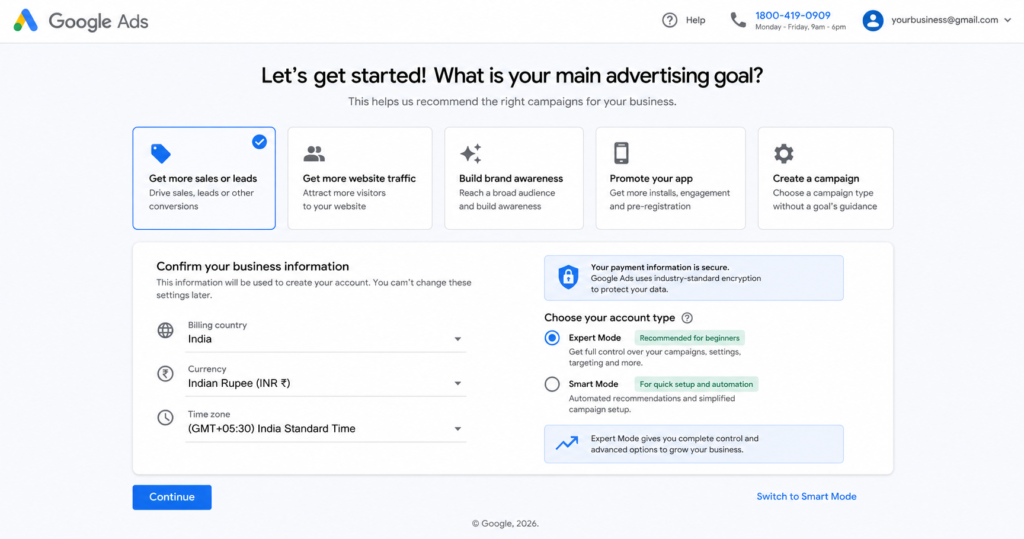
Step 1: Visit ads.google.com First, click “Start Now” and sign in with your existing Gmail account.
Step 2: Set your billing country to India Next, select India (INR ₹) as your billing country. This step is critical because you cannot change it later.
Step 3: Choose your payment method Fortunately, Google Ads India supports all major payment options:
- UPI — Google Pay, PhonePe, Paytm
- Indian debit and credit cards — Visa, Mastercard, RuPay
- Net banking
- Prepaid wallet mode — recommended for beginners to control spending
Why You Must Switch to Expert Mode
Finally, when Google asks you to create your first campaign, click “Switch to Expert Mode” at the bottom of the screen. This unlocks full control over your settings. Without it, the default Smart Mode hides most controls and, as a result, often wastes your budget unnecessarily.
For more detail on account structure, visit Google’s official Ads Help Centre.
3. Choosing the Right Campaign Type for Your Business
Not every Google Ads campaign type suits every business. Therefore, use this comparison table to pick the right one before spending a single rupee:
| Campaign Type | Best For | Avg. CPC in India | Difficulty |
|---|---|---|---|
| Search Ads | Services, local businesses, lead generation | ₹10 – ₹80 | Beginner |
| Display Ads | Brand awareness, retargeting visitors | ₹2 – ₹15 | Beginner |
| Shopping Ads | E-commerce product sales | ₹5 – ₹40 | Intermediate |
| YouTube Ads | Video reach, brand building | ₹0.25 – ₹2/view | Intermediate |
| Performance Max | Automated all-in-one campaigns | Varies | Advanced |
Which Campaign Type Should Beginners Choose?
For beginners, always start with Search Ads. They appear when someone is actively searching for what you sell, so the purchase intent is already there. Additionally, Search Ads give you the clearest and most useful data to learn from during your first month. Once you are comfortable, you can then expand to Display or Performance Max campaigns.
4. Keyword Research for Indian Markets
Keywords are the search terms you bid on. Getting this right makes the difference between a profitable campaign and a wasted budget. Unfortunately, this is the step most beginners rush through — and regret later.
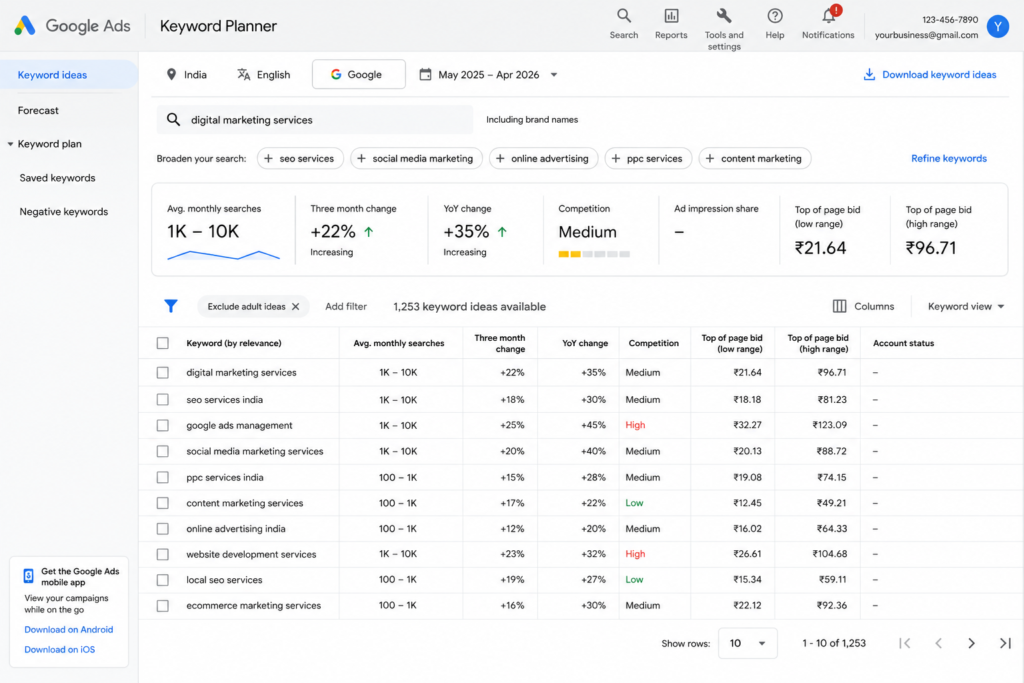
How to Use Google Keyword Planner
Google Keyword Planner is completely free and built right inside your ads account. Simply follow these steps:
- First, go to Tools → Keyword Planner
- Then click “Discover new keywords”
- Next, type your product or service — for instance, “wedding photographer Delhi”
- Finally, filter by location: India, or a specific state or city
Understanding the Three Keyword Match Types
- Exact Match [wedding photographer delhi] — Your ad shows only for that precise search. As a result, this works best for tight budgets because it avoids irrelevant clicks.
- Phrase Match “wedding photographer” — Your ad shows for searches containing your phrase. In other words, this offers a good balance between reach and control.
- Broad Match wedding photographer — Your ad shows for loosely related searches. Although this reaches more people, it can burn through your budget quickly if left unchecked.
How to Use Negative Keywords Effectively
Negative keywords block your ad from showing on irrelevant searches. For instance, if you sell premium furniture, add negatives such as: cheap, free, second-hand, wholesale, and DIY. Above all, this single habit prevents the most common form of wasted ad spend and can save you thousands of rupees every month.
Pro Tip: Many Indian users search in Hinglish (Hindi + English). Therefore, consider including terms like “sasta,” “best wala,” or city names in local spellings wherever relevant to your audience.
5. How to Set Your Budget in INR
“How much should I spend?” is the first question almost every Indian business owner asks. Here is an honest, practical answer.
Recommended Daily Budgets by Business Type
| Business Type | Daily Budget | Est. Monthly Clicks | Primary Goal |
|---|---|---|---|
| Local tuition centre | ₹300 – ₹500 | 90 – 180 | 10–20 leads/month |
| E-commerce store | ₹500 – ₹1,500 | 200 – 600 | 30–80 sales/month |
| Real estate agent | ₹1,000 – ₹3,000 | 100 – 300 | 5–15 inquiries/month |
| Restaurant or café | ₹200 – ₹400 | 80 – 160 | Footfall + delivery orders |
| Coaching institute | ₹500 – ₹1,000 | 150 – 300 | 15–30 admissions/month |
The golden rule: Treat your first month’s budget as a learning investment, not a guaranteed return. In other words, you are buying data, not just clicks.
Which Bidding Strategy Should You Use?
- Maximize Clicks — Ideal for beginners. As a result, Google automatically finds the most clicks within your daily budget without any manual input.
- Manual CPC — Gives you full control over individual keyword bids. However, only switch to this once you understand your numbers after 2–3 weeks of running ads.
- Target CPA — Only use this after collecting at least 30 conversions. Otherwise, without sufficient data, it simply does not work reliably.
6. Writing Ads That Get Clicks
Writing a great Google Ad is both a science and an art. Fortunately, once you understand the structure, it becomes much easier to write ads that consistently attract clicks.
Understanding the Three Parts of a Google Search Ad
A Google Search Ad has three core components that work together:
- Headlines — Up to 15 available; Google shows 3 at a time. Maximum 30 characters each.
- Descriptions — Up to 4 available; Google shows 2 at a time. Maximum 90 characters each.
- Display URL paths — Two short fields, 15 characters each, shown inside your ad URL.
How Google Assembles Your Ad
Before writing a single word, it is important to understand how Google uses your content. Specifically, Google automatically mixes and matches your headlines and descriptions to find the best-performing combination. Therefore, every headline you write should make sense on its own — rather than depending on another headline to complete the thought.
An Ad Formula That Works Well in India
Headline 1 — Include your focus keyword: Google Ads Setup India | Expert Help
Headline 2 — Highlight a clear benefit: Get 3X More Leads — Trackable Results
Headline 3 — Add trust or urgency: Trusted by 10,000+ Indian Businesses
Description 1 — First, identify the pain point, then offer a clear solution: Struggling to get customers online? We set up and manage Google Ads campaigns for Indian businesses with real, measurable ROI.
Description 2 — Finally, end with a strong call to action: Campaigns from ₹5,000/month. Free audit included. WhatsApp or call us today.
Writing Tips Specifically for Indian Audiences
- Include your city name — For example, “Best CA in Bangalore” consistently outperforms just “Best CA”
- Show INR pricing in ads — In particular, Indian users respond well to transparent, upfront pricing
- Add trust markers — Such as “GST Registered,” “ISO Certified,” “500+ Happy Clients,” or “15 Years Experience”
- Use CTAs that match Indian behaviour — Specifically, “WhatsApp Us,” “Call Now,” “Get Free Quote,” and “Book Free Demo” all perform very strongly
7. Tracking Results and Improving Your Campaign
Running ads without conversion tracking is the most expensive mistake a beginner can make. In fact, tracking shows you which keywords and ads produce real leads or sales — so you stop guessing and start making data-driven decisions instead.
How to Set Up Conversion Tracking
- First, inside Google Ads, go to Tools → Conversions
- Next, click the + button and choose your conversion type:
- Website action — form submission, purchase confirmation, or button click
- Phone calls directly from your ad
- App installs
- Finally, add the tracking tag to your website. Your developer can install it in under 10 minutes, or alternatively you can use Google Tag Manager for a no-code setup.
Your Weekly Optimization Checklist
Once your campaign is live, review these points every single week:
- ✅ Search Terms Report — Check which actual searches triggered your ads. Subsequently, add any irrelevant terms as negative keywords right away.
- ✅ Pause underperforming keywords — For instance, if a keyword has 50+ clicks but zero conversions, pause it immediately.
- ✅ Quality Score — Aim for 7 out of 10 or higher. Otherwise, a low score means you are paying more per click than necessary.
- ✅ A/B test your headlines — Always run 2 ad variations per ad group so that you can clearly identify what resonates with your audience.
- ✅ Device split — Compare mobile vs. desktop performance, then adjust your bids based on where conversions actually happen.
- ✅ Time-of-day report — For example, if most leads arrive between 9am and 6pm, reduce your bids overnight to save budget.
Key Metrics to Monitor
| Metric | What It Means | Good Benchmark (India) |
|---|---|---|
| CTR | % of impressions that result in a click | 3% – 8% for Search |
| CPC | Cost you pay per click | ₹10 – ₹80 depending on industry |
| Conversion Rate | % of clicks that become leads or sales | 2% – 8% |
| Quality Score | Google’s relevance rating for your ad | 7–10 is ideal |
| Impression Share | How often your ad shows vs. how often it could | 60%+ is healthy |
Above all, do not obsess over vanity metrics like impressions. Instead, focus on conversions — because that is what actually grows your business.
Have questions about this guide or need personalised advice? Feel free to contact us — we are happy to help.
8. Frequently Asked Questions
Q1. How much does it cost to start Google Ads in India?
Although you can technically start with ₹100/day, a realistic minimum for meaningful data is ₹300–₹500/day. For competitive sectors like real estate, insurance, or education, budget at least ₹1,000/day. Otherwise, you will not gather enough clicks to make informed decisions.
Q2. Can I run Google Ads in Hindi or other Indian languages?
Yes, absolutely. Google Ads fully supports Hindi, Tamil, Telugu, Bengali, Kannada, Marathi, and several other Indian languages. In addition, you can write your entire ad copy in regional languages and target users who browse and search in those languages. This approach is especially effective in Tier 2 and Tier 3 markets.
Q3. Do I need a website to run Google Ads?
You need a destination URL, but it does not have to be a full website. For instance, a single well-designed landing page works perfectly. Alternatively, many Indian businesses use a WhatsApp Click-to-Chat link as the destination for lead-generation campaigns. Above all, the page must load fast on mobile and match your ad’s message directly.
Q4. How long before I see results from Google Ads in India?
Initial data — such as clicks, impressions, and cost — appears within 24–48 hours of launching. However, for a consistently profitable campaign, allow 4–8 weeks. This is because Google’s algorithm needs sufficient conversion data before it can optimise delivery effectively.
Q5. Should I manage Google Ads myself or hire an agency?
If your monthly spend is below ₹30,000, managing it yourself using this guide — along with Google’s free Skillshop certification courses — makes strong financial sense. On the other hand, above ₹50,000/month, a certified agency typically delivers better returns than self-management. In either case, always check for the official Google Partner badge when evaluating agencies, as it confirms certified expertise.
Final Thoughts
Google Ads is one of the most powerful growth tools available to Indian small businesses in 2026 — provided you follow the right process from the very start.
Above all, the platform rewards relevance and smart strategy over raw budget. Consequently, a business spending ₹500/day with tight keywords and a clear offer will regularly outperform one spending ₹5,000/day without a structured plan.
To summarise, start with this simple framework:
- One campaign
- One tightly focused ad group
- 5 to 10 relevant keywords
- Two ad variations to test against each other
- Conversion tracking enabled before you spend a single rupee
Master this foundation first, then scale gradually. Most beginners fail not because Google Ads does not work — but because they attempt too much before truly understanding the basics.
In conclusion, you now have everything you need to get started. Go set it up today.
Last updated: May 2026 | Written for Indian small business owners and first-time Google Ads users